



A Forensic Focus Review of Cellebrite Endpoint Inspector
Endpoint Inspector: Precision Data Collection For The Real World
Chris Gagen, an experienced Technological Forensic Analyst for a municipal police service in Canada, reviews Endpoint Inspector from Cellebrite.
Cellebrite’s Endpoint Inspector is a solution designed for organizations to access, preserve, collect and review data from computers quickly and efficiently – without disrupting employee productivity. While it could be used in a law enforcement scenario, it comes with some limitations. As examiners, we no longer have the luxury of having our digital evidence physically in front of us. Companies can’t afford for you to ‘pull the plug’ and remove the hard drive. Not to mention more and more employees don’t even work in the office any longer.
Case Overview
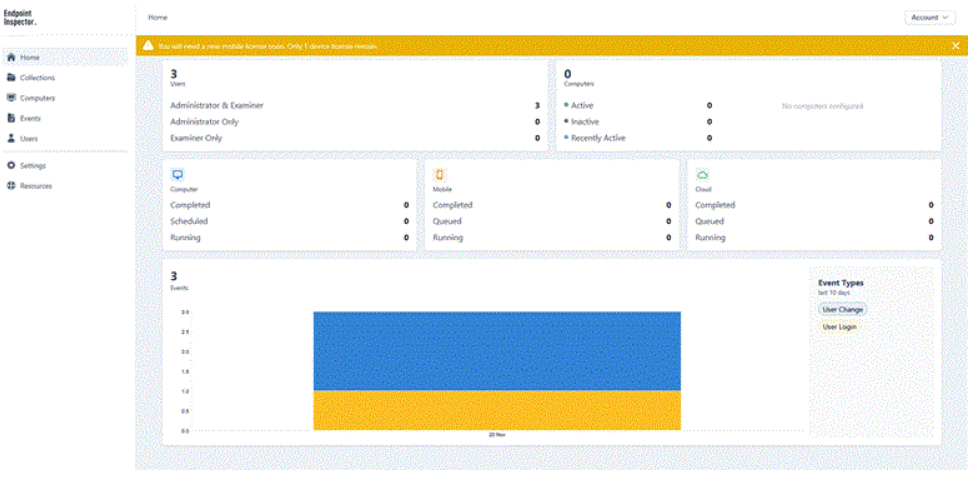
Once logged in to the web portal, you are presented with a dashboard that displays all the users on your team, the status of all the computers and the status of your collections. A few things need to be set up before creating collections; two of the most important being storage configuration and agent deployment.
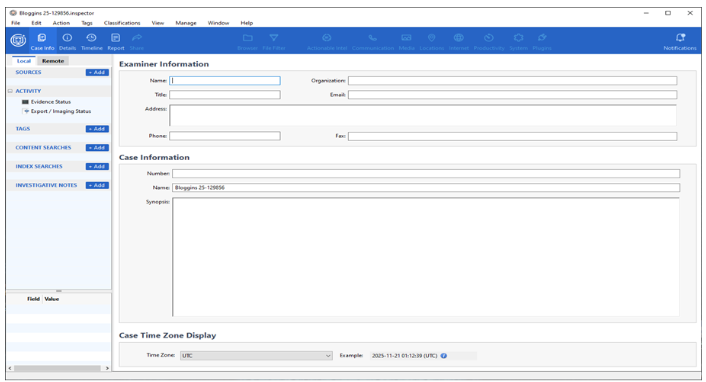 I had the opportunity to work with the Cellebrite team, taking this solution for a test drive. Since it is offered as a Software as a Service (SaaS), there’s essentially no software installation required. The management software is kept in the cloud, allowing you to use it anywhere you have access to a web browser. Licensing is subscription-based and adaptable to the size of an organization.
The ideal scenario for the deployment of Endpoint Inspector is when an organization has an IT manager, as this helps remove the end user from much of the work. The management platform relies on an agent being installed on the end user’s device, and supports Windows, macOS and Linux. There were times I had to realign the deployed agent with the configuration file or modify sleep settings on the device being analyzed. Most of this work would not be performed by an end user, and in managed environments, they may not even have permission to do so.
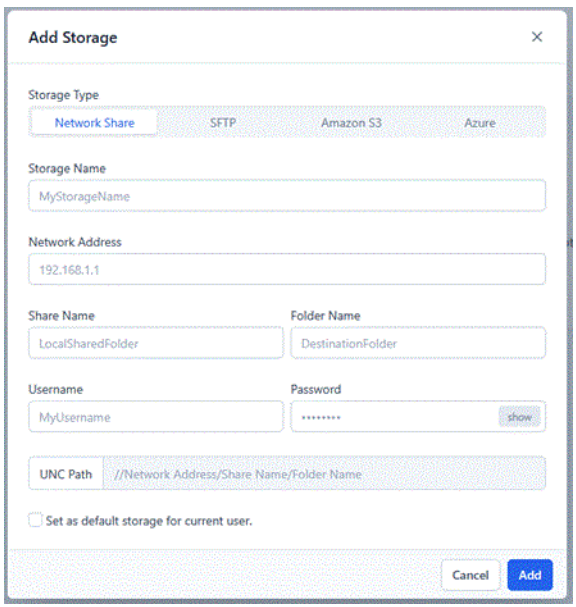 For a storage solution, I found it worked best to save your data to a cloud container. The supported options include Network Share, SFTP, Amazon S3 and Azure. Cellebrite may assist you in this process; however, you are ultimately responsible for sourcing your choice. This is one of the many times where having an IT manager will be beneficial, ensuring the evidence you are capturing is secure with the right controlled access in place
While you do have the option to save your data to local storage, I found this very problematic, and I repeatedly experienced extraction failures. During installation, the agent doesn’t create the folder that it needs the data to be saved in, but then it errors out if it can’t find the folder it needs. You will have to consider how much storage space is available on the user’s computer, and once the extraction is complete, you will still need to access the computer to transfer that data back to your forensic workstation. Speaking of that, the idea of writing the data you are extracting back to your user’s/target’s computer goes against core forensic principles of maintaining the smallest digital footprint possible on a target device.
Once you have the basics set up for your environment, you are ready to start creating collections. A collection is what type of extraction you want to conduct on any computer(s) you have access to. Files and Folders Collection allows you to target a date range, preset artifacts, e.g. iOS backups or Documents folder, various file extensions or keywords. An Incident Response Collection extracts volatile data, e.g. memory, open files, the clipboard, etc. Finally, you can create a Full Disk Image Collection.
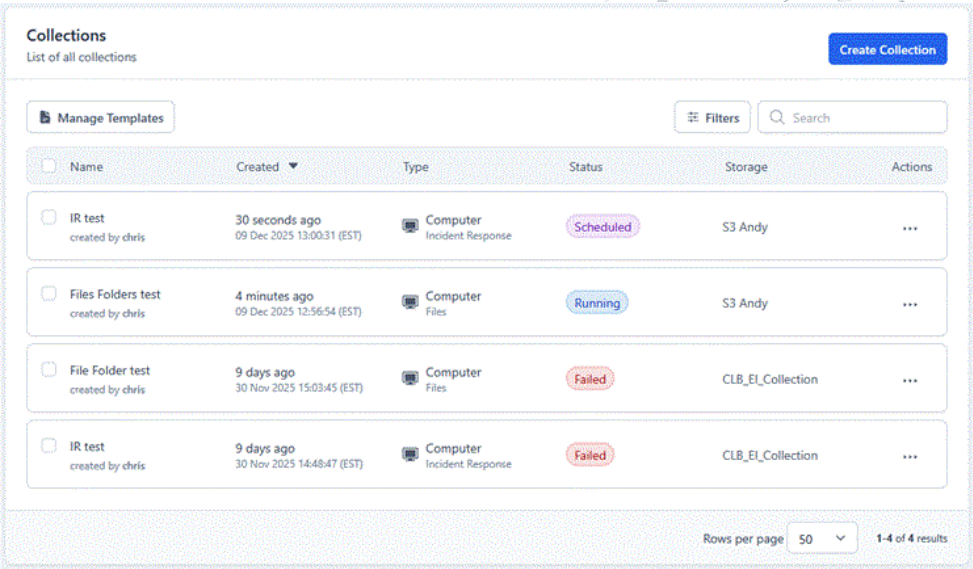
You have the ability to either launch this collection right away or schedule it for a later date. It actually works best to schedule during peak work time as this ensures that the device is on and active. One feature I would have liked to see is the ability to schedule repeat collections, or even restart a collection, especially after a failed attempt. While you can save templates of your common collections, it still requires a bit of user input to restart a collection.
Computer Devices
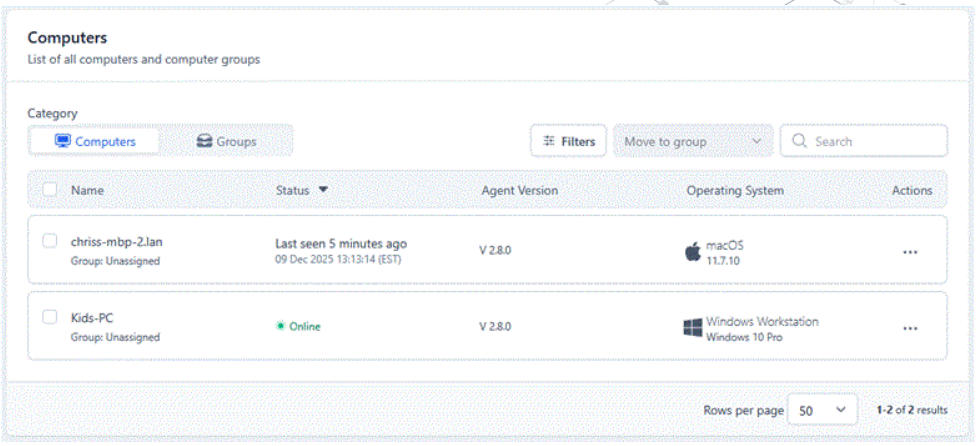
To add a device to your list of accessible computers, the agent must be installed first. In an environment with an IT manager, this could be done when the computer is being set up, before it is issued to the end user. This works when it is already a company’s policy for data collection and monitoring. Otherwise, when you are coming into an environment after an incident, the agent can be delivered by email.
Downloading the agents initially appeared inconsistent. Under the Agent menu, you will see the current version numbers of the computer agents listed, but no option to download them. From here, you can deploy the agent via email, and it will be up to the end user to select the appropriate operating system. For an IT manager, this would be a bit cumbersome. Aside from the fact that you need to email yourself the link to the file and can’t access it from the downloads page, all the files are named “Cellebrite_Endpoint_Agent.zip”, resulting in five of the same files that you will have to unzip to see which one is which.
Once installed, the agent runs in the background, allowing you to monitor from the dashboard whether devices are active, inactive (more than 24 hours) or recently active (within the last 24 hours). When a Collection is running, it is quite discreet, with no notifications or popups for the user. While conducting an extraction of a computer on a wireless connection, I detected no impact while I was concurrently streaming a YouTube video. A user would have to be closely monitoring their network traffic, memory or CPU levels to detect anything occurring in the background.
Analysis
Once you have data from your extractions, analysis can vary depending on your access to forensic tools. It is possible to integrate with eDiscovery tools such as Relativity, or more preferably, Cellebrite has their own tool available: Inspector. If you have been around the digital forensics community for a little while, Inspector will look and feel very familiar. In 2020, Cellebrite acquired BlackBag Technologies and their forensic analysis tool Blacklight, which has been rebranded as Inspector, along with MacQuisition becoming Digital Collector, the leading solution for Windows and macOS ‘dead box’ imaging and ‘live box’ targeted collection, plus triage.
Inspector has the ability to also integrate with Endpoint Inspector to perform a remote examination of your computers. Using the remote browser, you can go through the end user’s computer in real time. It is not 100% live; for example, if viewing the user’s desktop and they add a new file on it, you won’t see it unless you manually press Refresh. The frustrating part of the Refresh button is that it doesn’t keep you in the same path you were on, rather it returns you to the root of the volume.
In addition to the remote browser, you can query files using various filters or preview thumbnails. During this live examination, you can select items to add to a collection, then create a logical evidence file with all your files and add it into your open case file.
If not conducting a remote collection of a live device, then you would log into your cloud container and access the Logical Evidence Files created by your collections.
Summary
I see Endpoint Inspector flourishing in large, controlled environments where an organization has a dedicated IT manager who oversees smaller, targeted collections when required to support internal investigations. It would also be effective for an eDiscovery company, managed service provider or law firm to engage after an incident and, with the assistance of an on-site IT manager, conduct remote device extractions.
While ‘dead-box’ forensics was once the ideal method for gathering evidence, in a growing number of circumstances, it is no longer practical. From data storage constraints caused by over-seizure to crippling organizations by taking devices and users offline for hours or days, few can now afford these complications.
Endpoint Inspector allows more precise data collection while the computer is live, eliminating inconvenience to the user and employer and keeping data storage costs down for the investigating organization.
————
Reviewed, written and originally published by Forensic Focus.